// feature set
Everything you need.
Nothing you don't.
TrackItWeekly packs enterprise-grade inventory management into a tool any staff member can master in minutes.
Explore a real store. No signup needed.
5 min
To first count
14-day
Free trial
4
Plans for any size
0
POS integrations needed
// counting & scanning
Count faster. Count smarter.
Barcode Scanning
Scan barcodes using your phone camera OR connect any Bluetooth scanner via HID mode — no drivers, no apps, no extra setup. Supports UPC, EAN, Code 128, Code 39, QR, and Data Matrix formats. Toggle Bluetooth scanner mode on or off anytime from Settings.
Bluetooth Scanner Support
Connect any standard Bluetooth barcode scanner in HID keyboard mode — Zebra, Honeywell, Socket Mobile, Tera, and more. Pair once, scan to count or scan to add items. Works on iOS and Android. No proprietary SDK or hardware subscription required. If your scanner behaves like a keyboard, it works with TrackItWeekly. No drivers, no apps, no setup.
Scanner Settings Toggle
Turn Bluetooth scanner mode on or off directly from the Settings page. The app works exactly the same without a scanner — it is an optional upgrade, not a requirement.
Weekly Count Cycles
Built around weekly rhythms — the cadence real businesses actually use. Set your cycle, assign staff, run the count, done.
Offline Mode
Count in walk-in coolers, basements, or anywhere without wifi. Everything syncs automatically when you're back online.
Spreadsheet Import
Upload your existing Excel or Google Sheets file and your full inventory loads in minutes. No manual re-entry.
// stock control
Always know what you have.
Reorder Alerts
Set par levels per SKU. Get instant alerts when stock dips below threshold — before you run out, not after.
7-Day Usage Trends
Automatically calculated week-over-week usage so you can spot patterns, reduce waste, and order smarter.
Instant Discrepancy Flags
Count doesn't match your expected levels? TrackItWeekly surfaces the discrepancy immediately so you can act.
// teams & access
Built for teams of any size.
Team Collaboration
Assign staff to specific areas or sections. Multiple people count simultaneously and results merge in real time.
Role-Based Access
Staff see only their location. Managers see their region. Owners see everything. Granular, simple, and secure.
Multi-Location Management
One dashboard for all your sites. Compare inventory across locations side by side, and spot outliers fast.
Audit Trail
Every count, every edit, every alert — logged with a timestamp and user name. Full accountability, always.
// reporting & export
Reports that write themselves.
One-Click Exports
Export to CSV, Excel, or PDF instantly. Share with your accountant, supplier, or head office in seconds.
Usage & Variance Reports
See what moved, what didn't, and where discrepancies appeared — automatically calculated every week.
Mobile-First Design
Every report is readable on a smartphone screen. No zooming, no horizontal scrolling, no frustration.
Count History
Full historical log of every count cycle. Track trends over weeks, months, and quarters.
// standalone & simple
Standalone & Simple.
TrackItWeekly runs on its own — no POS, no hardware, no integrations. Open it, import your stock, and start counting — no download, no install, nothing to set up.
No POS Required
Works independently or alongside any existing system.
No Hardware
Just your phone — any iOS or Android device.
No Integrations
Nothing to connect, configure, or maintain.
Works Offline
Count stock even without wifi.
Any Device
Your whole team can use their own phone, tablet, or computer.
// see it in action
Every screen, built for speed.
Real screenshots from the app — not mockups, not renders.
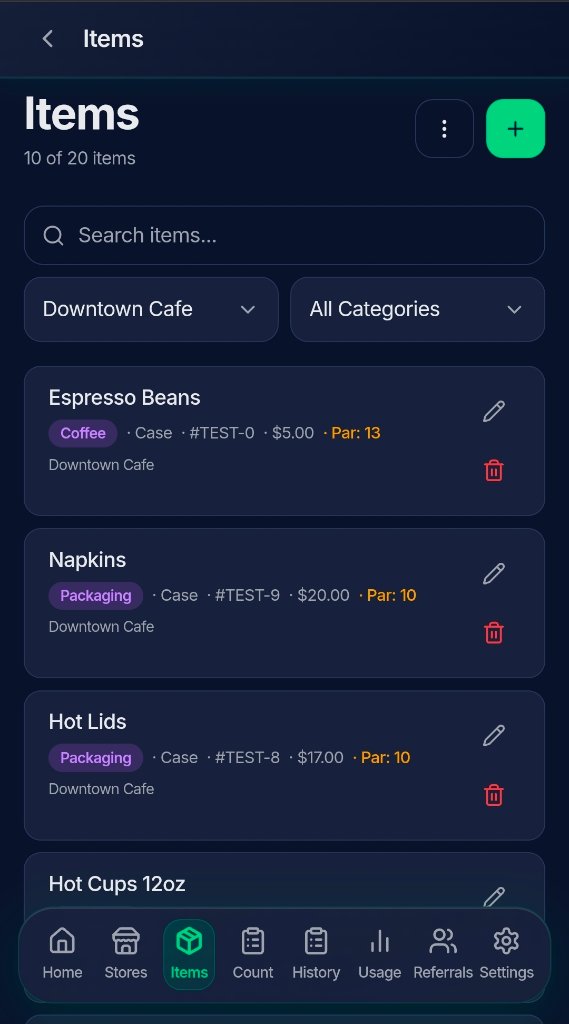
Items & Catalog
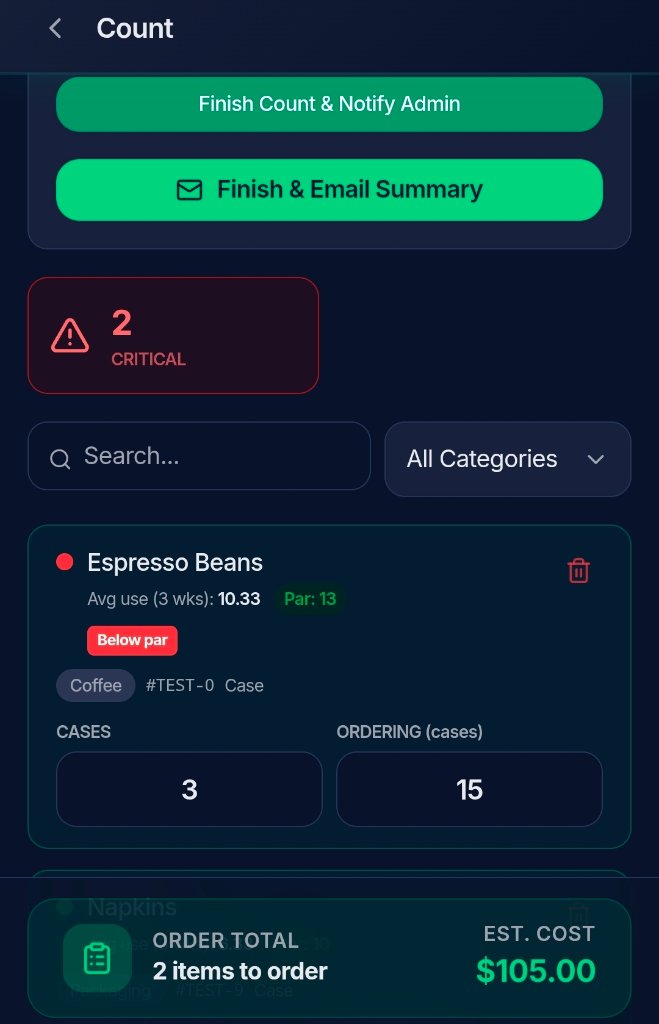
Live Counting
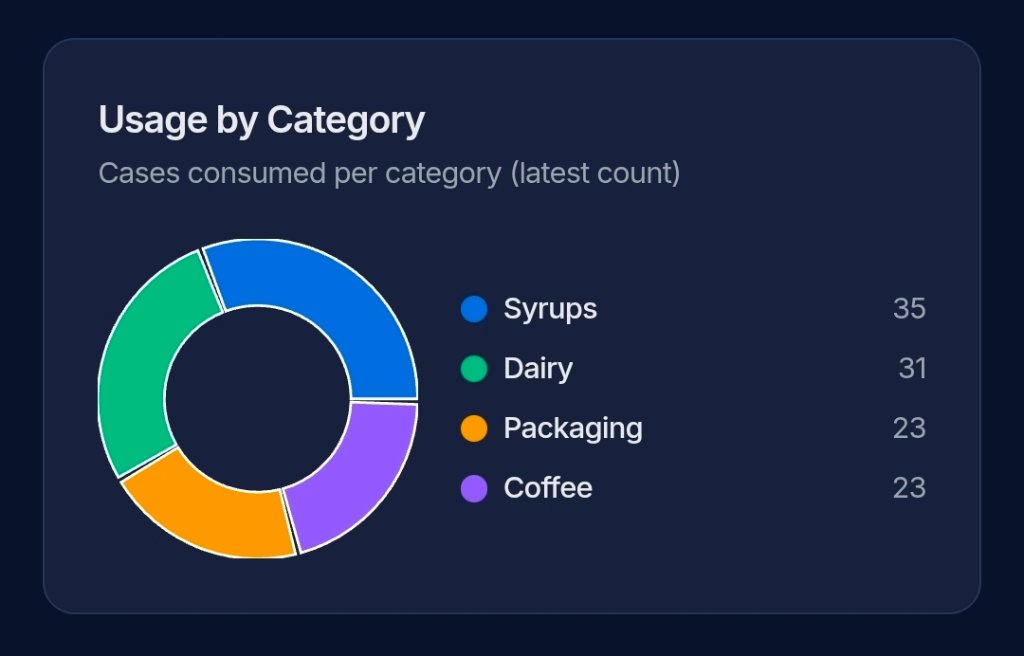
Category Breakdown
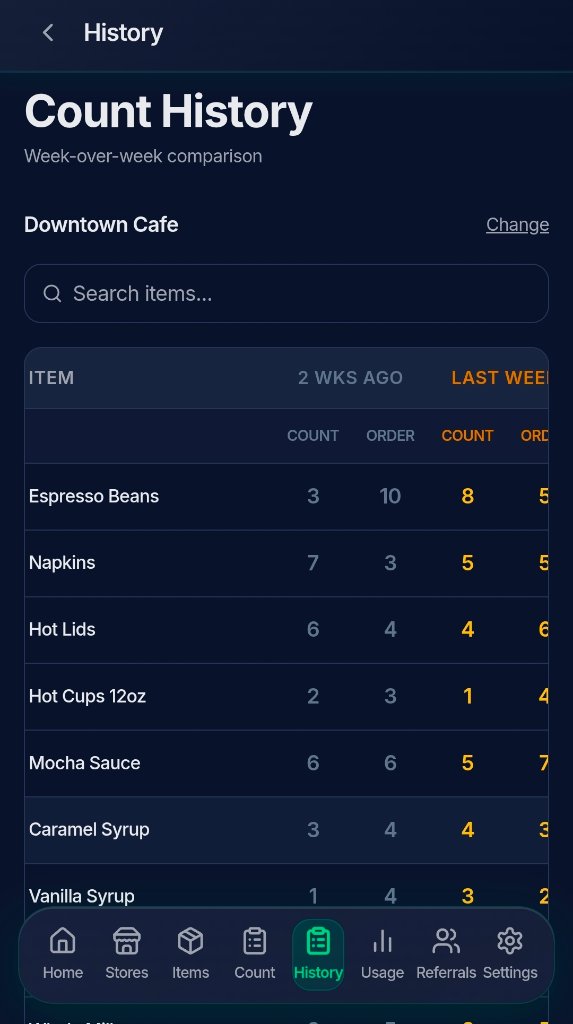
Count History
See every feature in action.
Free for 14 days.
No credit card. No setup call. Works on any phone, tablet, or computer in 5 minutes.